Saturday, 23 April 2016

Japanese Garden - New pattern

I've entered my first pattern competition!


This pattern is entered for 'The Sprout Patterns Design Challenge' - For a Japanese Garden-themed design to go on their new Asaka Kimono. The winner’s design will be featured in the launch of the new kimono pattern and all top-ten designers get prizes.

If you have a spare few minutes I would love your vote!
You can vote here: www.spoonflower.com/sprout-design-challenge

And see my fabric design here -
www.spoonflower.com/fabric/5309480-japanese-garden-by-cecca

If you haven't heard of it before, Spoonflower is a great site where you can get your designs turned into fabric, wallpaper and wrapping paper. Sprout Patterns is their partner company where you can have any fabric pattern printed into specific pattern pieces for clothing.

I've also listed a few different colourways of the pattern in my RedBubble store, so it's available on a number of lovely items including:


Japanese Garden - Red & Gold Chiffon Top 
Japanese Garden, Blue, Cushion


 Japanese Garden, Blue Chiffon Top


 Japanese Garden, Blue, green and pink Ipad case


Japanese Garden Iphone case

Monday, 14 March 2016

Number 1 on RedBubble for today!

My Poole Quay print is being featured on RedBubble's home page today. And it seems to have the Number 1 spot! Yey! :-) 


They're also doing 20% off today, just use code GIMME20

Check out the home page here -http://www.redbubble.com/found
Or hope straight over to my portfolio page here - http://www.redbubble.com/people/cecca-designs/portfolio


Tuesday, 23 February 2016

Patterns

Since becoming a full time mum (2 yrs ago) I’ve been taking a bit of a break from printmaking but a few months ago I started to find time for a slightly different kind of art. And I quickly became addicted to digital pattern making. As an art form it doesn’t need too much space, or make much mess, or need long periods of time devoted to it. So it is much easier to fit into my life at the moment.
So far I’ve created quite a number of patterns and uploaded some of them to Spoonflower (a fabric/wallpaper site) and some to Redbubble (who do T-Shirts, mugs, phone cases and art prints etc). I’m hoping to develop some pattern collections in the future. And I’m planning to re-imagine some of my linocut print designs as patterns too. 
My Spoonflower shop is here – http://www.spoonflower.com/profiles/ceccaI’ve only got 4 designs for sale at the moment but lots more show up if you click ‘Designs not for sale’.
My Redbubble shop is here - http://www.redbubble.com/people/cecca-designs I’ve set up a number of patterns plus a couple of my linocuts and a watercolour on there so far.
Here are a few of my patterns so far:

Elephants (green & blue) 
 Fish (work in progress)
 Natural forms
 Ducks and frogs in the garden (Teal)
Striped Pigs & Ponies (Peach Melba)

Saturday, 7 June 2014

Exhibiting is Important to me

Exhibiting is important to me
I don't wear make up
Or expensive clothes
I don't make speeches
Or fancy prose

I am no writer
I do not act
I no longer dance on tables
Or compete at poker
I use my time

For a single urge
I paint and draw
I design and create
I carve and engrave
Rolling and pressing

Mixing and printing
Drying and aligning
Print and repeat
Select and edition
Mount and frame

A chance arises
A new selection
Frame and string
Package and deliver
Curate and hang

Promotions are tricky
Like speech or performance
What and how to expose
To who
I don't like to ask

I am too English
Can't presume or impose
Take up your time
Request your presence
And now it's too late

The show goes on
I have my share
Of interest and luck
Passers by and holiday makers
But I wish I had been braver

It may not be
The Main Event
The exhibition of a life time
But it is a piece of me
Two years work

In a few years
There will be another
With different work
I will try harder
Next time


Wednesday, 21 May 2014

Dorset Art Weeks 2014

Dorset Art Weeks (DAW) is one of the largest open studio events in the country, with nearly 300 venues showing the work of almost 1000 artists. It starts this Saturday and runs for two weeks until June 8th. I'll be sharing Ruth Oak's studio which is above Poole Printmakers, who are also having an open studio for DAW.

Ruth is a painter and printmaker whose work has a strong element of drawing: "I have always been inspired by landscape, while much of my current work takes inspiration from poetry and works with words, sometimes taking the form of artist’s books. The “vessel” is a subject which frequently emerges in my work and I see it as a symbol of myself, a person making a journey, a life or a view of the world, the self in relation to God, the inner and outer world. It is a personal but also universal symbol to which I hope all can relate. I use a wide variety of painting and printmaking media and techniques"

Ruth has recently been working on a series in wood engravings to illustrate “Step in Anywhere” a book of poems by Jane Wilson. The original engravings will be on display along with the finished book during the open studio.

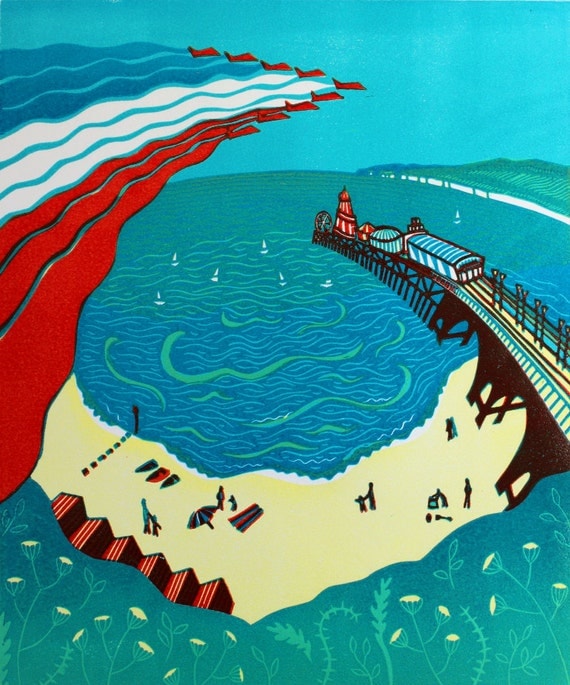
I will be showing prints and paintings from three main series that I have been working on over the past couple of years. The first is linocuts of Dorset views including Gold Hill, Poole Quay and the Red Arrows flying over Bournemouth pier.
My second theme is illustrative animals, from milkshake drinking monkeys to crocodiles nibbling on cucumber sandwiches. And lastly I will be showing a small selection of the portraits I have painted, many of which were the result of my membership of the inspiring international portrait artist's group JKPP.

Our open studio for Dorset Art Weeks runs 24th May – 8th June 2014, open daily (except Tuesdays) 11am – 5pm. To see details of our venue and all of the others visit the Dorset Art Weeks site.


Wednesday, 23 April 2014

Red Arrows, Bournemouth - The new Dorset Magazine cover


Thrilled to see my linocut 'Red Arrows, Bournemouth' on the cover of the new Dorset Magazine!!
The cover was chosen to promote Dorset Art Weeks which is on 24th May to 8th June. I'll be showing my work alongside Ruth Oaks' beautiful prints and paintings at her studio above Poole Printmaker's studio, we are venue 11 in the DAW brochure or website.

Wednesday, 27 November 2013

Printer Wonderland!

It's Printer Wonderland at the Red Hot Press this friday evening! Among lots of other great printmaker's work I'll have a load of original prints, cards and handmade sketchbooks for sale and it should be a great event ~

Join us on Friday ...29th November 6:30pm - 9pm at our annual Christmas sale here at Red Hot Press.

Have a glass of mulled wine and see all our lovely handmade wares prints, cards, gifts, books... all made by members of Red Hot Press. We will also be displaying (and selling) the 20:20 2013 print exchange and original works made for the Cowprint Artists' Calendar.

Buy local and handmade this Christmas!

For more info see the Facebook event page -
Some of the prints and cards I'll have for sale:


Thursday, 19 September 2013

Animals in Art

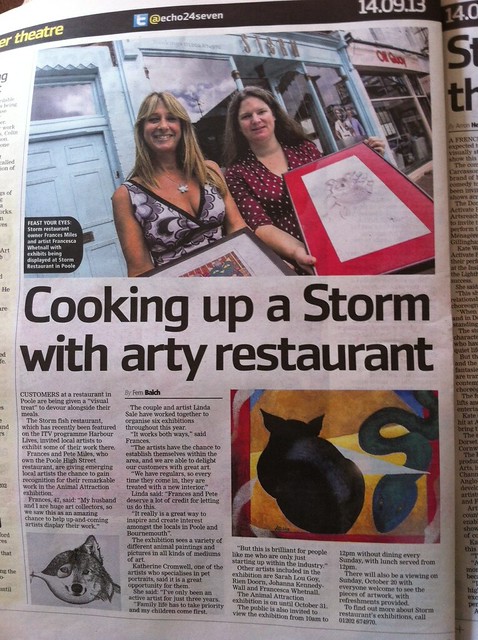
During September and October some of my animal linocuts are part of a great group exhibition at Storm restaurant in Poole. The exhibition features work by six artists with very different styles. Below are examples from some of the artists and a lovely little article that was in last Saturday’s local Echo. Yes, that’s me in the paper, urgh!

 
Egyptian Cat by Linda Sale  ~ http://www.linda-sale-fine-art.com/


Chicken by Sarah Lou Goy - http://www.pinkspiral.co.uk/
 
 
Dog portraits by Katherine Cromwell - http://www.facebook.com/KatherinesPaintings


A big thank you to Linda Sale who organises the exhibitions at Storm and to Frances Miles the restaurant owner who does a great job supporting local artists. Also, thanks to Katherine Cromwell for arranging the Echo article! I was also lucky enough to have work on display at Storm last summer, when they were filmed for the series 'Harbour Lives' with Ben Fogle. I know it's not a huge claim to fame but some of my watercolour still-lives were on the walls of the restuarant in a few shots of the series!

More info and shots of the exhibition here - http://stormart.webs.com/


Saturday, 7 September 2013

Poole Printmakers exhibition at Highcliffe Castle

Poole Printmaker’s next exhibition is at Highcliffe Castle from 11th September until 3rd November. There will be over 40 framed prints on display, with even more mounted prints and cards available to buy.

Highcliffe is a beautiful building in a lovely location and on the 18th of September they are having a Heritage open day which means it’s free admission all day (normally £3.25 for adults) and they will be opening later – with last admission at 7.30pm and the doors closing at 8pm.

We are making the most of the open day to hold our Private View which will be from 5:30 to 7:30pm on Wednesday the 18th of September. There will be wine, soft drinks and nibbles and it should be a great evening!


Friday, 23 August 2013

Red Arrows come to Number 83, Westbourne, Bournemouth

Thrilled to have my Red Arrows linocut in Number 83's fab window display!
They've also taken 4 other framed originals, some mounted prints and some of my new Dorset linocut cards, which have started selling already!
 
Here's a pic of the window and some of the other prints and cards they're now stocking:
 
 
Number 83, Westbourne - Beautiful Red Arrows window display with my framed linocut on the right


Poole Quay, original reduction linocut


Happy Cat - Original engraving


Red Arrows, Bournemouth - blank greetings card from my original linocut

 
Gold Hill - blank greetings card from my original linocut
 

Friday, 8 March 2013

Poole Printmakers at the Lighthouse

Poole Printmakers are exhibiting at the Lighthouse in Poole for 6 weeks starting next weekend. And I just managed to get my latest linocut finished in time to go on the poster! It's a reduction linocut and I've kept to almost monochrome colours (which is quite a change for me), but added some small touches of blue and red. You'll be able to see my 'Poole Quay' linocut and the other linocut that I've been working on 'Bournemouth Gardens' at the Lighthouse exhibition.
 
Poole Printmakers Exhibition at Lighthouse, Poole

Thursday, 14 February 2013

Folksy front page!

My Valentine's selection is on the Folksy front page!

Happy Valentines day!

Sunday, 6 January 2013

New Year, new site!

I've discovered Society6, and it's beautiful!
Having tried out a few similar sites in the past, Society6 is a really good-looking, and easy to use site, full of beautiful artwork and a slick range of products.

In their own words:
"The artwork on Society6 is created by hundreds of thousands of artists from around the world.
When you buy a product from Society6, we produce it using only the highest quality materials, and ship it to you on behalf of the artist."

I've decided to start with just a few of my favourite prints to begin with, and try and add a new one once a month... Here is a preview of what's in my store so far:

Happy Cat

Tiger teatime cushion
 
Hello Bear print

To see my new Society6 store, go here

Friday, 23 November 2012

Black Friday & Cyber Monday - Weekend Sale

For Black Friday/Cyber Monday weekend I've reduced 12 of my favourite original watercolour paintings by 20%!


Have a look at my sale section for a closer look.
 
AND I'm also offering 10% off your whole order with the code 10OFFBFCM2012.
 
Sale ends on Tuesday 27th Nov.
 
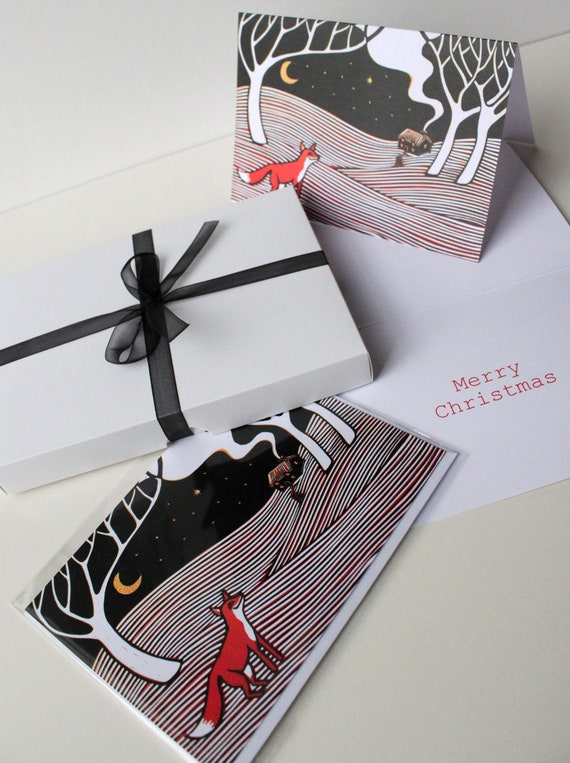
I've also just added a new selection to my range of cards which I'm quite exciting about. Here are some of my favourites:


You can see all of my individual cards here and all my card and postcard sets here.


Tuesday, 30 October 2012

Craft Coffee Cupcakes - Christmas Fairs!

Craft Coffee and Cupcakes are an exciting new art & craft venture that are coming to Bournemouth this November! They will be at the Pavilion Dance in Bournemouth Gardens on Sunday 11th and 18th of November, and the best in local art, craft and design will be on offer.

The jewellery, clothing, accessories, tasty food, beautiful cards, art and more will be accompanied by a lazy Sunday afternoon feel. The events are being sponsored by local hero’s Jimmy’s Iced Coffee and Lulubelle’s Cakes, who will be providing the 'Coffee and Cupcakes' of the title.

I'll be there on the 18th with a stall full of all my latest original prints and cards, check out my page on the Craft Coffee & Cupcakes website http://craftcoffeecupcakes.co.uk/francesca-whetnall/.

My latest reduction linocut


And I can't wait to have a browse through all of the other fantastic looking stalls! Some of my favourite local artists and crafters will be there too ~

Lisa Berkshire of Cheery Deary - http://craftcoffeecupcakes.co.uk/cheery-deary/

Beautiful mixed media mirror by Lisa Berkshire


Jill & Martin from Jilly Bird - http://craftcoffeecupcakes.co.uk/jilly-bird/

Fab Christmas mug from Jilly Bird


Karen from Print & Repeat - http://craftcoffeecupcakes.co.uk/print-and-repeat/

One of Karen's beautiful prints

Elanor McBay - http://www.elanormcbay.co.uk/hand-made-cards.html

Some of Elanor's crochetted and knitted creations

Craft Coffee and Cupcakes is the baby of Neil and Sarah Leonard. The couple, who together have a wide wealth of experience of craft and design incorporating everything from textiles and print to web and film, are now concentrating on event organising, creating collaborations across the creative sector.


Tuesday, 23 October 2012

Poole Printmakers Exhibition at Russell-Cotes Art Gallery & Museum

Poole Printmakers next exhibition will be at the beautiful Russell-Cotes Art Gallery and Museum from November 6th until Jan 27th 2013.

After a successful job with the Shaftesbury Arts Centre poster I was asked if I'd like to design the poster for this exhibition too, and I was able to put my latest linocut to good use! It's a 3 block linocut print, on which I've used transparent colours which create additional colours where they overlap. I hope to sort out a blog post with a bit more about how I created the print in the next few weeks.

The exhibition should be another great selection of original etchings, linocuts, collagraphs, monoprints and more from the talented group that are Poole Printmakers. And Russell-Cotes is always a fantastic gallery to visit, so if you've never been there before, this is a great excuse to get down there! It's also free over the winter, so what could be better!

Wednesday, 15 August 2012

An overview of Image size and DPI

I've written this mainly to help other artists who may need to produce 300dpi images to create printed versions of their artwork. I hope I've included most of the basics - feel free to skip along to the headings that you are interested in and please leave me any questions in the comments.

What does DPI mean?

DPI means how many dots or pixels will be printed per inch. It’s sometimes referred to as PPI (pixels per inch). Basically, the higher the DPI, then the better quality the prints will be.

However, a file showing a property of 72dpi might be better quality than another file that shows 300dpi – the actual image quality depends on the number of pixels in the image, also known as the pixel dimensions of the image.

i.e

  • An image showing 300dpi and pixel dimensions of 600 x 600 pixels will print a 300dpi image at 2 x 2 inches.
  • An image showing 72 dpi and pixel dimensions of 6000 x 6000 pixels will print a 300dpi image at 20 x 20 inches.
Conversely, changing an image’s dpi will change it’s print size. So, the same file can be printed quite large at a lower resolution, but the image quality will suffer.

i.e
  • A  6000 x 6000 pixel image will print a 300dpi image at 20 x 20 inches.
  • A  6000 x 6000 pixel image will print a 200dpi (lower quality) image at 30 x 30 inches.

What DPI do I need?

Web images

For posting images to the web you don’t need a very high dpi to show a good quality image. Image sizes for the web, also need to be kept relatively low so that the image size doesn’t slow down your web page or prevent images from loading at all. The standard size of images for the web is 72dpi.

Printing images

For professional printing purposes, an image being prepared for print should be no less than 300dpi if high image quality is required.
A resolution of around 200dpi can be used, but
lowering the DPI produces progressively lower output quality. The ideal DPI is dictated by the required quality and size of the final printed product.


How can I find out the DPI of my image?

For JPGs -

Right click on the photo and click properties.
Right click on the ‘Details’ tab and scroll down to where it shows the image details.
It will display something like this:

Dimensions                   1936 x 2592
Width                            1936 pixels
Height                           2592 pixels
Horizontal resolution      72 dpi
Vertical resolution          72 dpi

To understand what this means in real terms you need to divide the pixels by the DPI to see how many inches the image will be.

Formula to convert pixels to inches: Pixels ÷ DPI = Inches
So, for the example image above, at 72 DPI:

The width is  1936  ÷ 72 =  26.889 inches
The height is  2592  ÷ 72 =  36 inches

However, 72 dpi isn’t high enough quality for printing, so to work out how big your image will print at 300dpi you just need to divide the image dimensions by 300 instead of 72.

So, for the image above, at 300 DPI:

The width is  1936  ÷ 300 =  6.45 inches
The height is  2592  ÷ 300 =  8.64 inches

So if you print this image at 300 dpi then it would print out at 6.45 x 8.64 inches.

Photoshop/Adobe files

If you have Photoshop, you don’t need to get out your calculator.
Just bring up the image menu and click on Image size.
This window will show the pixel and document dimensions and the resolution.
If the image is showing a resolution of 72 dpi you can change this without altering the file, just make sure you untick the box ‘Resample Image’ first.

Then you can change the resolution number to 300 to show how that would affect the printed size.


What are Megapixels (MP)?

A camera’s megapixel (MP) count refers to the number of pixels it can capture by the million. The MP of a standard compact camera is usually based on the production of photo’s in 4:3 proportions. If a camera is branded as ‘4 megapixel’ this means that it will take photos containing approximately 4 million pixels. So, a photo of 4:3 (adjusted at best quality or highest resolution) has 2304 x 1728 pixels = (rounded off) 4.000.000 pixels = 4 MP.

If your 4MP camera is set to take the highest quality photos then you can calculate the maximum print size by dividing the camera’s pixel dimensions by 300 (the ideal print DPI):

2304/300 = 7.68” width
1728/300 = 5.76” height

So 7.68 x 5.76” is the maximum print size that the camera is capable of.


How do I take  an image with 300 DPI?

Taking a photograph

Images taken on a digital camera (or phone) usually display a dpi of 72. These photos will also be printable at 300dpi, you just need to calculate the final printed size based on the pixel dimensions of the photo.

The most important thing to remember when taking a photo with the aim of printing it is that you take as high quality photo as possible. A good quality digital photo should be:

  1. taken with a good quality digital camera (good optics and digital sensor)
  2. a photo that has not been enlarged either in post-processing or by in-camera digital zoom.
  3. properly shot with good lighting and no blur
  4. a photo shot within the camera's ideal ISO range (usually a low ISO such as ISO 100)
  5. stored in either a lossless format (i.e. TIF) or a very low compressed JPEG (highest camera JPEG quality setting).
  6. taken at the highest quality setting their digital camera allows.
If your camera is not capable of taking a photo with a dpi high enough for your required print size, or if you don’t have the experience or equipment necessary to take a high quality photograph you may need to consider using a professional photographer, or having your work scanned.

Scanning

If you're creating a digital image by scanning you have to set the DPI of the scan to meet the required DPI at the dimensions it is to be printed.

Formula for calculating the DPI needed:

Scanning DPI needed = (Required print size* x Print DPI) ÷ Original artwork size*

*The required print size and original artwork size is this formula refer to either the height or width of the image. You should do both calculations and use the higher result for your final scanning DPI setting.

Example:

Required print size = 60x40”
Print dpi = 300
Original artwork size = 10x8”

Pixel dimensions needed:

Width =  60x300 = 18000
Height = 40x300 = 12000

Scan DPI needed:

Width = 18000 / 10 = 1800
Height = 12000 / 8 = 1500

The two DPIs are not the same, as the aspect ratio (proportions) of the two print sizes are different. The rule is to simply pick the largest DPI number, in this case 1800dpi.

Some more simple examples:

To print a photo originally sized 4 by 5 inch the same size - scan it at 300 dpi.
To print a photo originally sized 4 by 5 inches at 8 by 10 - scan it at 600 dpi so that the final print size will be 300 dpi.

N.B Scanning at high resolutions makes great demands on your scanner’s memory, so if you need to scan at very high resolutions you may need to go to a printer with a higher spec scanner.


Can I increase the DPI of my image?

Ideally you should start with an image that’s high enough resolution at the required print size. But, as a last resort you can increase the dpi of an image using photoshop (other programs are probably available). Increasing the DPI of your image whilst keeping the width and height the same (or increasing the width and height whilst keeping the dpi the same) is known as resampling.

Don't resample an image unless you have no other option. The image will not be as high quality as it would be if you took a high enough resolution photograph/scan originally. Never resample the same image more than once as this will degrade the quality.

There are two ways to increase the size of an image in Photoshop, you can either resize the image, or you can resample it. These are not the same thing!

The difference between resizing and resampling: 

  • Enlarge by resizing – Increases the size of the image whilst reducing the dpi (untick ‘resample image’ box)
  • Enlarge by resampling – Increases the size of the image whilst maintaining (or increasing) the dpi (tick ‘resample image’ box). This will physically increase the number of pixels in the image!
To resize OR resample within Photoshop go to ‘Image’ and click on ‘Image size’. This window will show the pixel and document dimensions and the resolution.

To increase the DPI of your image you just need to tick the ‘Resample Image’ box and increase the resolution from 72 to 300 – your document size settings will remain the same, whilst the DPI is increased. It is as quick and simple as that, but you need to consider that enlarging your image and creating new pixels where they didn’t previously exist is bound to affect your image quality and will not improve it!

Photoshop has a number of ‘interpolation algorithms’ which control how it handles adding pixels when you resample an image to a larger size. There are three main options to choose from:
  • Bicubic Sharper – Use this option when resampling your image smaller for best image quality
  • Bicubic Smoother – Use this option when resampling your image larger for best image quality
  • Bicubic – Not really used much now that the other options are available.
Just remember, increasing resolution in Photoshop WILL NOT increase the quality of the image. It should only be used as a last resort to create images that will print slightly more successfully than lower resolution ones. You will never be able to create a really high quality image from a low dpi file.


This post was put together with lots of help from the following websites and forums, thank you!:


What Printshops really want


Friday, 29 June 2012

Summer Art & Craft Workshops 2012

The Arlington Arts Cafe in Bournemouth is running an exciting series of art and craft workshops this summer. There will be friendly tuition provided in the beautiful setting of the cafĂ© terrace, overlooking Bournemouth’s Lower gardens.

Ever fancied learning how to crochet, sculpt or print? Are you a keen amateur painter or a complete beginner looking to improve your skills? Then these are the workshops for you!

The workshops run from late June right through into September. Each session will be for 2 hours in the morning or afternoon and will require no previous experience. Adults and children welcome! (all children must be accompanied by an adult ).

I will be running a number of Relief Printmaking workshops as part of the summer season. From potato prints to wood engraving, relief printing is a great way to create exciting and repeatable printed images. On my workshops you will be taken through the steps to create your own original, handmade prints using simple equipment including
plasticine, card and polystyrene. 


The price for each 2 hour workshop is just £7.50 per person and includes a free drink!

Booking is not essential, but recommended to avoid disappointment. All paper, paints and equipment will be provided, so you are welcome to just turn up on the day.

To book, or find out more leave me a comment or -

Book on one of the workshops on Facebook
or
Phone the Arlington Arts CafĂ© on 01202 552879 or contact  Ruth Kelvin on 0758 6431184
or
Email enquiries@arlingtonbournemouth.co.uk or email ruthkelvin37@gmail.com.
or
visit the Arlington Arts Cafe website

This series of Summer Art workshops have been arranged and co-ordinated by Ruth Kelvin of the RK Collection.

For further info and the full schedule see the Arlington Arts Cafe website

Monday, 28 May 2012

Dorset Arts Week 2012 - Exhibition at Poole Printmakers

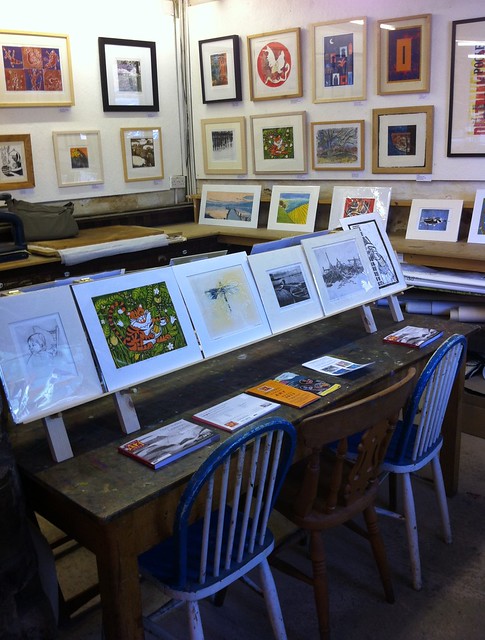
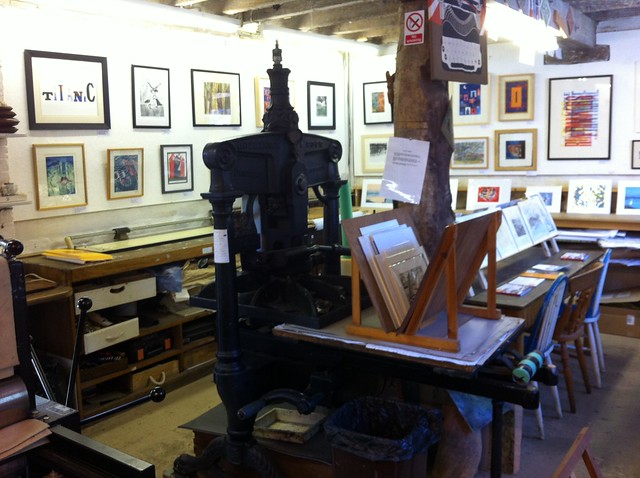
Dorset Arts Week started this weekend and Poole Printmakers have a beautiful selection of prints on show including a handful of mine.

The workshop will be open from 26th May till 8th June, with loads of beautiful affordable prints to buy & the opportunity to have a good look round the workshop and see artists at work.

Prices for framed original prints range from just £25 to £300.

Here are some snaps of the exhibition in the quiet before the opening:


For more info see the Poole Printmakers page here - http://www.poole-printmakers.org.uk/DAW_Page.html

For more photos see my Flickr set or Facebook page

LinkWithin

Related Posts with Thumbnails