Saturday, 20 March 2010

The Waterfront, Bournemouth

On 20th January 2010, Bournemouth Council announced that it is buying the Waterfront building on Bournemouth’s seafront – once voted England’s most hated building in a Channel 4 poll. Hurrah! This monstrosity has been ruining the view of Bournemouth's seafront for as long as I've known it. It will be so good to have a view of the beautiful coastline and seafront.


Bournemouth Council are considering a number of options as a replacement. Their main aims are:

1.To improve sea views; and
2.To bring about an all-weather attraction that is commercially viable, successful and can be enjoyed by people from all walks of life, in a building that residents can be proud of

And they're putting six options to the vote:

1.A water park
2.An interactive arts activity centre and museum
3.Tropical gardens
4.A spa
5.Performing arts space and amphitheatre
6.A family play park
7.Boutiques and bistros

Whilst I really like the idea of the arts activity centre and museum it's difficult to tell how it would work and exactly what the activities would involve. I also quite like the sound of tropical gardens - but I think any solution needs to combine a number of things - cafe, gardens, fountain & arts and crafts!

Here are my thoughts (and comments to the council) -

It would be good to have space for a local art & craft gallery or shops. There is a real lack of art & craft venues in Bournemouth so this would fill a much needed gap in the market. Craft supplies shops and boutiques would add to the creative feel e.g a bead shop, art supplies shop, model shop, knitting/embroidery supplies.

If this could be combined with an area for art and craft workshops that would be a real benefit to all ages of the community. Art and crafts are a great way to unite people and get the community talking and sharing experiences at the same time as learning new skills. It's also a great way to get people involved with the environment, Bournemouth's history, different cultures. The possibilites are endless and it's a great opportunity to improve the culture and social environment of Bournemouth.

Having the workshops so close to the inspiring sea front area would make them really attractive - painting the sea, making paper mache fish, beach hut models, sea inspired jewellery - we could really make the most of the beautiful coast and seaside attractions.

Possible workshops include:
Drawing
Watercolours
Knitting
Silver Clay jewellery
Beading
Puppet making
Electronics/robotics
Nature studies

Arts University College Bournemouth run a range of courses that could be adapted to one day or half day workshops.
Bournemouth Creatives are another source of creative people who could run workshops.

Why not have your say?
For more detail on the options and to vote see the council's website here


Thursday, 11 March 2010

Exciting Collaboration!

Early last month I received a fantastically generous offer from someone via my Dick and Franny shop on Folksy. The talented and very lovely Kat Milligan offered her photography and modelling to me to help create beautiful images of my jewellery.
As someone struggling to find enough time to paint and make jewellery, let alone photograph, edit and list my work, this was an offer too good to be missed! It can make a huge difference having high quality photos, so I was thrilled to be given this great opportunity.

Since offering me the collaboration Kat was involved in an accident which left her with an almost completely severed finger! Argh! I can't believe she's continued with the commission. After an operation to reattach her finger Kat has persevered and mastered one handed photography with the lovely model Lylium who struggled through bad weather to attend the photoshoot.
I'm really grateful to Kat and Lylium, and I can't wait to see all of the photos!

Here is a taster of the great results:


Check out Kat's Photography on RedBubble

And her modelling page on Model Mayhem

And Lylium's moddelling page on Model Mayhem


Thursday, 25 February 2010

My Colours

Some of my favourite paintings. Is there a recurring theme?


My Colours
Originally uploaded by Franny B

Monday, 1 February 2010

New Paintings - Negative Painting & Frisk Film

Negative Painting - Bee on salvia

Painted from Sarah M's lovely photo: www.flickr.com/photos/daftdabbler/2127038309/
From the group 'Artists Sharing Photo References' : www.flickr.com/groups/aspr/

I haven't tried this sort of thing before, so the background went a bit wrong. And I didn't know what I was doing with the negative painting, so I didn't really manage it. I quite like the richness of the colours tho - I'll just have to try again!

To see some fantastic negative painting, and a great tutorial have a look at Beverly Morgan's Flickr stream. Here is a link to 'Step 1' of her tutorial: http://www.flickr.com/photos/bevmor/4291143834/

And here is an example of one of her beautiful negative paintings, "We follow the Sun":


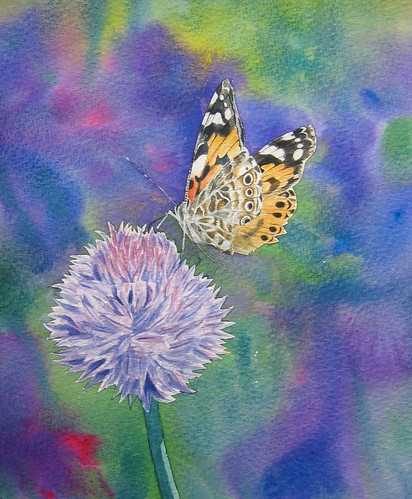
Frisk masking Film - Painted lady


I painted this background right after painting the Bee background, so at least I knew to work fast and not let parts dry. What I hadn't quite realised, was that I didn't need to put down such strong colours. I think I was just panicking in my rush to get paint down before the paper dried!

This was also my first experiment with 'Frisk' masking film. I can't believe how easy to use and brilliant it is! By the time I'd stuck it down, drawn round my drawing, unpealed it, stuck it back to the backing paper, cut out the shapes and stuck it back on the paper, it was really not sticking at all. But when I painted the edges down with water and then paint the film stayed magically in place! Now that I've got a better idea of how to use it, I won't do that sticking, unsticking thing again and I guess it will be even easier!

I'm not sure if it's worth trying to darken or lighten the background. Or if I should just learn from the mistake and have another go...

Painted from my photo: http://www.flickr.com/photos/franny_b/3859767453/in/set-72157623158286092/

Friday, 29 January 2010

Etsy Pixel Picker!

Check out my new amazing Etsy Pixel Picker!
You can upload a picture from your PC or pull in a picture from the internet by pasting in the jpg URL. Then click somewhere on the image where you see a colour you like and watch as a magical rotating colour cube of Etsy items appears. If you don't like the items click again!

This could be great for finding earrings or jewellery to match an outfit - just upload a photo and click to search!
Here's a screenshot of me playing with one of my favourite paintings. I picked up a lovely leaf green from the stripes on the right:

Have a go and enjoy! http://www.francescawhetnall.co.uk/sl/etsy/etsypixelpicker.htm

NB - You'll need to install the Silverlight plugin when prompted. (Silverlight is Microsoft's version of Flash).

Tuesday, 26 January 2010

The Broadway Melody

I've got a lovely new scanner and I've started scanning and uploading my vintage books and songsheets to Flickr. A lot of them are quite tatty, but the illustrations are still great!


Broadway Melody - Written by Arthur Freed, composed by Nacio Herb Brown:

There may be streets that have their sorrow,
They built that street for smiling faces;
A tear today, a smile tomorrow;
Of glum folk there you'll find no traces;
But there's a street that lives in glory,
For down that road of life and chatter,
It always tells the same old story.
It's only happy people matter.

Don't bring a frown to old Broadway,
You've got to clown on Broadway.
Your troubles there are out of style,
For Broadway always wears a smile.
A million lights, they flicker there,
A million hearts beat quicker there.
No skies of gray on the great White Way,
That's the Broadway Melody.


Sunday, 3 January 2010

Draw Gallery - sneak preview!

It's new, it's here and it's amazing!!
How would you like to draw your own gallery in seconds?
Here are some examples, I'm sure you can do better!:

To draw your own gallery:

- Use the tools on the tool bar to draw your own gallery.
- Use the Image tool to draw any shape you want an image to appear in. You can draw as many images as you like.
- Use the Next Button tool to draw any shape you want for a next button. You can draw as many next buttons as you like.
- Use the Prev Button tool to draw any shape you want for a previous button. You can draw as many previous buttons as you like.
- Use the Decorate tool to decorate the gallery. Use the colour palette to choose your colours. Remember you can also use the green and red Next and Prev Button tools as decorations.
- The tool bar can be hidden using the toggle tab on the side.

Have a go here: The Draw Gallery


It's not completely finished yet, but it's pretty good!

At the moment it's picking up pictures from my Flickr Feed, but there may be further developments so that it can pick up any Flickr feed...

Monday, 21 December 2009

Amazing Silverlight Physics Banner

Wow!! look at my amazing new 'Dick and Franny' banner. It was created in Silverlight using physics and other magic stuff.
You can drag and drop the letters & make up exciting new words, or just pile them up in a heap!
Brilliant fun!!

The original static image was taken from my Etsy shop's header, I'm not sure if there is a way I can add it back into Etsy...

Monday, 7 December 2009

Christmas Angel

Original watercolour and ink painting of a Christmas Angel.
I tried out a few techniques for this painting -

1. I started with the sky, painting a mixture of pinks and purples in a wash of watercolour over the whole sky, leaving a curved shape at the bottom white, for the snowy hill. Into the sky I sprinkled salt, to give the snowy effect - as the paint dries the salt absorbs the paint wherever it's sprinkled, leaving an interesting speckled texture.

2. Using a very thinned down wash of lilac/purple I added some shadowy textures to the snowy hill.

3. I painted in the trunk and branches of the trees using some white acrylic. I used this quite thickly, so that the sky didn't show through.

4. Using a selection of coloured fine line pens I drew the angel across the sky. I used blues to outline her dress and yellow and oranges for her hair, halo, wings and trumpet.

5. I used more white acrylic to highlight areas of the angel, and make her stand out from the background. You can still see some of the original pink speckly sky in areas of her dress. I also added touches of yellow watercolour to the trumpet and parts of her wings.

6. The final step brought the whole painting to life - before this the sky was speckled pink all over and the angel and trees weren't standing out enough. I mixed up a large quantity of dilute midnight blue watercolour and painted a wash over the whole sky, being careful to paint round the edges of the angel, and to leave space round the branches of the trees.

I've ordered some Christmas cards using this design, can't wait to see how they turn out!

Angel

This original painting is available in my Etsy and Folksy shops:
Dick and Franny at Etsy
Dick and Franny at Folksy

Friday, 20 November 2009

Francesca Whetnall 2010 - Watercolour Calendar

I've just created a calendar of my watercolours for 2010. I've chosen a broad selection of my paintings from this year. All are watercolours but some have some mixed media elements and one has a bit of collage. I've also selected a combination of still life and landscape paintings as a reflection of the way I paint - moving from one subject and style to the next.

The paintings I've chosen are:

January - Little Window

February - Roses
Roses

March - Yellow Tulips


April - Bluebells
bluebells

May - Forde Abbey
Forde Abbey

June - Boats at Beer
Beer Boats

July - Barcelona Sunshine
Barcelona Sunshine

August - Red Tulips


September - Sunflowers

October - Gold Hill
Gold Hill
November - Have a Nice Day, Mr Shark


December - Winter Shadows
Winter shadows
View the full calendar here:

Monday, 9 November 2009

LinkWithin

Related Posts with Thumbnails